FOCUS

Redefine what a CRM can do to help you find and win business.

How many times have you come into work, sat down, and felt a little confused about where to start your day? You know you have a long list of tasks and to-dos, but it’s not easy to sift through the information and know where to start.
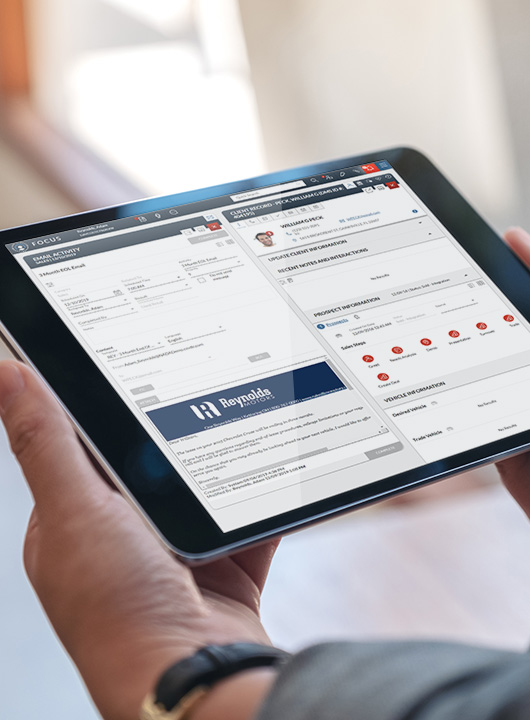
FOCUS is an automotive-specific CRM designed to help you prioritize your most important customers based on profitability. It provides an easy and intuitive dashboard to see every touchpoint with your dealership – all activities, customer and deal information, website interactions, and appointments and service details – so you can move customer relationships forward from anywhere at any time.
Videos are only available with JavaScript enabled.
View Transcript
FOCUS Tablet

Benefits of FOCUS


Profitable

Leverage intelligent insights to focus on customers most likely to buy, helping your team prioritize high‑value opportunities, improve close rates, and drive stronger dealership profitability.

Efficient

Streamline daily operations with a seamless desktop‑to‑mobile workflow that reduces manual effort, saves time, and helps your team stay productive and connected—whether at their desk or on the go.

Insightful

Utilize data from both FOCUS and ERA-IGNITE for a full picture of your customer, empowering your team to make more informed decisions, tailor interactions effectively, and provide personalized experiences based on comprehensive insights.

Automated

Take the guesswork out of customer communication by utilizing AI-generated messaging that is personalized with relevant and timely information for each client.

Convenient

Built as part of Reynolds Retail Management System to ensure a seamless end-to-end process, providing a complete picture of your customer from sales to service.

Track and Manage Tasks with Role-
Specific Dashboards


Dashboards are personalized based on your job role, allowing you to focus on tasks and
measure goals important to helping you and your dealership succeed. 

FOCUS Main Dashboard
Customer Status
Manage each customer in real-time. See which salespeople are with customers, on a test drive, or need help closing a deal.
Clear Objectives
Tasks are created for each sales conversation and prioritized based on a customer’s likelihood to buy. This includes recommendations for up to three additional in-stock vehicles with talking points curated specifically for each customer to help you have more informed conversations.
Ensure Follow-Up
Utilize AI-generated text messages and emails that can be personalized using a tone dial, so each message resonates with each individual, and take into account previous interactions with the dealership.

Access Information Anywhere


Sales people can go anywhere with the customer and have all the information they need
from their phone, while also being able to communicate with the desk. 

FOCUS Mobile
Eliminate Repetition
Track opportunities, contact prospects, and work your entire sales cycle using the mobile application without reentering data. 
Employee Performance
Use real-time data to coach salespeople in the showroom, the lot, or a test drive.

Manage Your Service Relationships


Capitalize on service opportunities with your existing customer base and communicate the right message at the right time.

This screenshot shows the dashboard for FOCUS.
Track and Follow Up
Reduce uncertainty in next-step communications by viewing a complete list of previous service work and any previously declined services.
Re-engage Past Customers
Improve customer loyalty by sending relevant promotional offers for previously declined services.
Increase Revenue
Reduce no-shows by avoiding missed appointments with automatic reminders to customers about their appointments.

What can you experience:

Top Enhancements

Available Add-On Options

calendar icon

Easily Add or Edit Service Appointments

Profits from your service department are crucial to your dealership, but does the responsibility of scheduling service appointments fall solely on your service department? What if they’re busy and they miss the call?
Streamline Your Service Appointment Process

LaneView

Capture more revenue by reducing no shows and proactively loading your shop with LaneView. By enabling your service, BDC, and sales departments to easily add, modify, or delete appointments within FOCUS, you’ll boost first-time service appointments, retain current customers, and re-engage past service customers.
Icon of phone

Quickly Manage All Call Activities

Phone leads are a precious source of potential customers, but are you missing opportunities due to their information being documented incorrectly or poor follow-up processes?
Uncover Missed Opportunities

Callbright

Capture more leads, reduce advertising spend, and make the most out of every phone lead through real-time phone tracking, inbound and outbound call monitoring, and managing all call activities directly from FOCUS. Schedule call follow-up, enter notes, and easily record calls, optimizing marketing investments and improving CSI.
Icon of paper with checkmarks and pen next to it

Scan IDs for Automatic Data Entry

Manually entering data is tedious. Your customer is eager to check out a car, and you’re clicking away at the keyboard inputting their information. What would it mean for your business if you could get test drives started faster?
Capture Data in Less Than Two Seconds

ID Scan

Eliminate manual data entry, clerical errors, and wasted time with ID Scan. The compact scanner takes less than two seconds to transfer the necessary information into your CRM, getting your customers to the next step faster. With automatic triggers, the ID will scan as soon as you set it down and a photocopy will print if needed.
Mobile Payment Icon

Text Customers for Quicker Response Times

Phone calls from an unknown number typically go unanswered. And your messages are easy to lose with a full email. When you need a quick response, a text is the way to go.
Boost Your Open Rates

Unlimited Text Messaging

Improve your customer’s experience and increase your open rates by sending messages to customers based on their preferences. Send and receive text messages, manage text messaging activity, track inbound and outbound text messages with easy-to-read reports, and receive system alerts within FOCUS. 
Cash Analysis Icon

Get Credit Approval Faster

Most customers don’t know their credit score, and it can be intimidating to have a hard pull done to check it. Why waste time working with incorrect assumptions that lead to the loss of sales when you can easily check eligibility with just a name and address?
Improve Your Closing Ratio

Pre-Screen

Differing from a credit report inquiry, Pre-Screen doesn’t negatively impact credit scores and only requires a name and address. Quickly find out if you’re working with a prime, near-prime, or sub-prime buyer by reviewing credit scores and prior auto loan data. Then, easily provide a credit offer to those who qualify. 

Related Resources

Blog Post
3 Reasons You Need a CRM in Your Service Drive
eBook
Redefining CRM: Take Back Control to Wipe Out Inefficiencies
Blog Post
Lights! Camera! Action! Adding Video to Your Sales Process

Contact Us

Interested in learning more about FOCUS? Please fill out the form below or start a conversation with us in the chat. 
Forms are not available without JavaScript enabled
Headline
What’s next
Form Contacts
Sales
Document Services
POWER Support
Technical Assistance Center
Overview

After clicking submit, a specialist will contact you shortly to discuss your needs. We value your privacy and will not share your information with other third-party providers.

Contact Section Headline
Prefer to call?